Not one AI. A team of enterprise AI agents.
Replace brittle workflows, rule-based automation, and chatbots with AI business process automation — teams of AI specialists that reason, collaborate, and complete real business work, from a customer request to an internal operation.
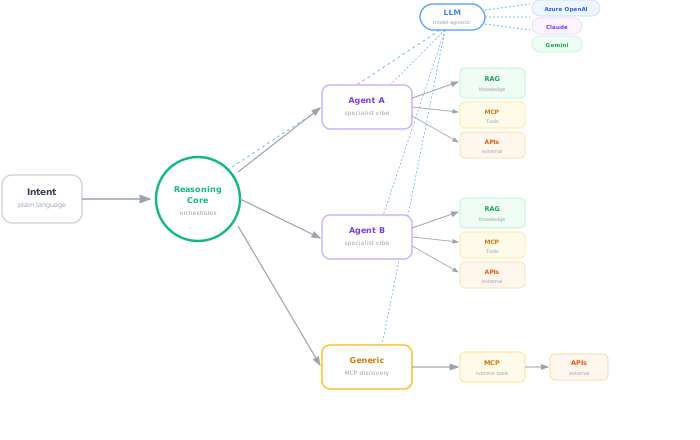
A specialist for every part of the job.
Most “AI agents” are a single model trying to do everything — support, triage, analysis, action — all at once. That's like hiring one person to be your whole department. Missions are different.
A reasoning core
Reads the situation. Reads every agent's description and knowledge. Decides who handles what — not from a hardcoded script, but from judgment.
Teams of specialists
Each agent owns its own knowledge, tools, and authority. One knows the network. One knows the tickets. One knows the customer. They collaborate.
Dynamic routing
The same question can take a different path depending on who's asking, what the policy says, and what the knowledge knows. No two tickets follow the same flowchart.
Full transparency
Every decision traced with numbered reasoning steps. Nothing happens in a black box — your ops team sees why, not just what.
What is a Mission?
A complete business objective carried out by a team of AI specialists.
Unlike a chatbot conversation or a workflow, a Mission adapts, delegates, reasons, and finishes only when the work is complete.
Example: “Refund this customer.” · “Onboard this new hire.” · “Resolve this outage.”
Your business runs on handoffs.
Every process sits in a queue behind a human who has to click, copy, paste, forward, approve, and route it somewhere else.
to onboard one employee.
to diagnose one incident.
of enterprise processes still triggered manually.
This isn't a tooling problem. It's a coordination problem. And no flowchart builder is going to fix it.
Any trigger in. Any action out.
Missions don't need a human to start. A monitor firing, a schedule hitting, an email landing, a sensor spiking — anything your business emits can activate a mission. And the Reasoning Core decides who handles it next: a specialist, an observer, a generic agent with MCP tool discovery, or a 3rd-party system.
Triggered by anything · Orchestrated by one brain · Executed by the right kind of agent
Example: Customer Refund.
A refund request, handled by a team of specialists — coordinated by the Reasoning Core, with a human on the one call that needs one.
Not a chatbot. Not a flowchart.
Workflow automation
- • If this, then that
- • Every case follows the same path
- • Break the rule, break the workflow
- • A flowchart with a login page
Missions
- • Understand the situation, then act
- • Every case reasoned on its own merits
- • Policy changes, behavior follows
- • A team of specialists, coordinated by judgment
Knowledge-driven, not rule-driven
Write a policy document in plain English. The mission reads it and follows it. Change the document — the behavior changes. No sprint. No redeployment.
User-aware routing
Same question from a VIP customer and a trial user takes different paths. The mission knows who's asking and applies your policy automatically.
Runtime tool discovery
Agents discover new tools the moment you register them. Add a connector today — your missions can use it this afternoon. No redeploy.
Every decision traced
Numbered reasoning steps. Every tool call logged with identity, duration, and parameters. Nothing happens in a black box.
Three ways to ship a mission.
Start from a template. Build it visually, no code. Or describe a new one in a sentence. Every path ends the same way — in production, same day.
Start from a template
Pick one of 14 missions, each a ready-to-run team of specialist agents with default knowledge and tools.
Build visually
Upload your runbooks. Connect your tools. Rewrite the policy — the behavior follows. No code, no sprint.
Describe with AI
Type one sentence — "Build a mission for vendor onboarding." StudioX assembles the agents and wires the tools.
Build your first Mission.
Skip the chatbot. Skip the workflow canvas. Let's run a real mission on your systems.